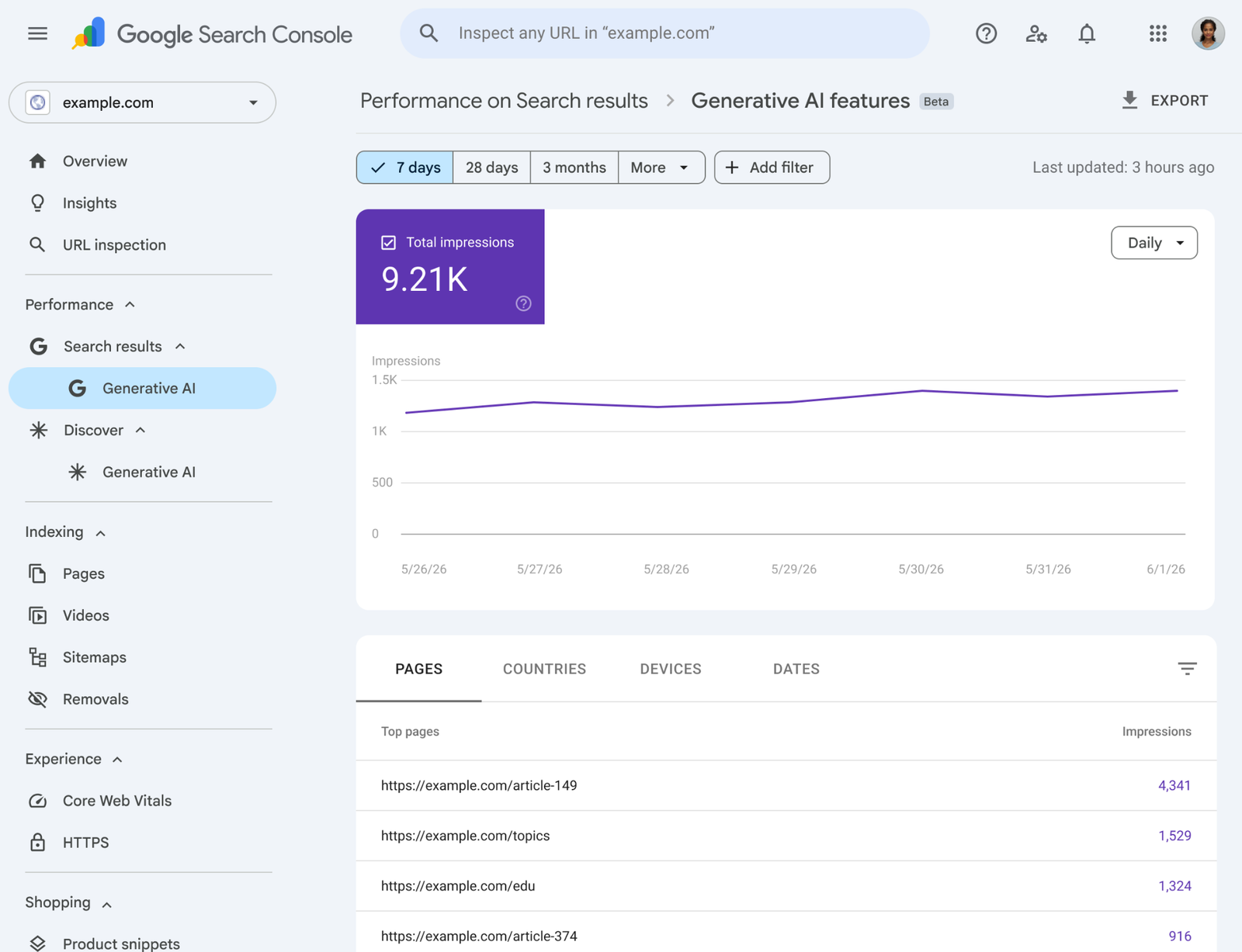
For years, website owners had a simple problem with AI search: they could see that AI Overviews and AI Mode were changing search behavior, but they could not clearly measure how often their pages appeared inside those experiences.
That changed in 2026. Google Search Central introduced dedicated Generative AI performance reports in Search Console, and Google later said these insights had rolled out globally by August 31, 2026.
The new reporting gives site owners a practical way to track visibility in generative Search experiences instead of guessing. It can show impressions, pages, countries, devices, and performance over time for appearances in features such as AI Overviews and AI Mode.
This guide explains how to use that data without overreacting to daily changes or turning your SEO strategy into a race for vanity metrics.
What the New Generative AI Reports Actually Measure
The first thing to understand is that AI-search visibility is not the same as a normal blue-link ranking.
A page may be used or shown within an AI-generated search experience even when the user does not see it in the same way they would see a traditional search result. That makes the reporting useful, but it also means you need to interpret it differently.
Impressions
An impression tells you that a URL from your site appeared within a supported generative AI search experience. It is a visibility signal, not proof that the user read your page or clicked it.
Pages
The pages view helps you identify which URLs are appearing most often. This is one of the most useful parts of the report because it lets you compare content patterns rather than staring at a site-wide total.
Countries
Country data shows where your AI-search visibility is happening. This matters if your business targets specific markets or if your content is localized.
Devices
Device data can reveal whether visibility differs between mobile and desktop experiences. That can help you spot content or usability gaps.
Dates and trends
Time-based reporting lets you track whether visibility is growing, falling, or shifting after major content changes, technical fixes, or Search updates.
Do Not Treat AI Impressions as a New Ranking Score
A common mistake is to reduce the report to one number and ask, “How do I increase this as fast as possible?”
That approach can push teams toward weak tactics, such as publishing dozens of thin articles just to cover more possible prompts.
Instead, treat AI impressions as one layer of diagnostic data. The real question is: which pages earn useful visibility, and what makes those pages valuable to users?
A better question
Instead of asking, “Why did AI impressions fall 12% this week?”, ask:
- Which topics gained or lost visibility?
- Which pages are consistently appearing?
- Are those pages also earning qualified traffic?
- Do the visible pages contain original information?
- Are important commercial pages missing?
- Is visibility growing in the countries that matter?
These questions lead to useful action.
Build a Baseline Before Making SEO Changes
Do not edit pages immediately after opening the report for the first time. First create a baseline.
Use at least a few weeks of data
Daily AI-search visibility can move for many reasons. Search demand changes. Google tests features. News cycles affect query volume. Your site may be crawled at different times.
Look for patterns over several weeks when possible.
Record your top visible pages
Create a simple sheet with:
- Page URL.
- Main topic.
- AI impressions.
- Traditional Search impressions.
- Clicks.
- Primary country.
- Device split.
- Last major content update.
This gives you a reference point for future changes.
Compare AI Visibility With Traditional Search Performance
The most useful insights often come from comparing the new report with normal Search Console data.
Scenario 1: high traditional visibility, low AI visibility
This may happen when a page ranks for simple navigational or factual searches but does not answer complex questions well.
For example, a page called “Email Marketing Definition” may rank for a basic keyword but offer little depth for an AI-generated comparison or planning query.
The solution is not to add random words. Improve the page only if users would benefit from more examples, decisions, steps, or original insight.
Scenario 2: high AI visibility, low clicks
This may mean the page is useful as a supporting source, but the AI result satisfies much of the user’s immediate question.
You can still create a stronger reason to click by adding tools, templates, original data, detailed examples, visual demonstrations, or deeper analysis that cannot be fully summarized in a short response.
Scenario 3: strong AI visibility and strong clicks
Study this page carefully. Look at its structure, originality, topical depth, visual content, internal links, and update history.
Do not copy the wording into other posts. Copy the useful process that made the page strong.
Segment by Topic Instead of Looking Only at URLs
A single page can be noisy. Topic-level patterns are often more reliable.
Group your pages into themes such as:
- Beginner education.
- Comparisons.
- How-to guides.
- Product or service pages.
- Original research.
- News and updates.
- Templates and tools.
Then compare which groups receive the most AI visibility.
Example
A marketing site may discover that generic “what is” posts receive many normal impressions but limited generative visibility, while detailed comparison guides and original studies appear frequently in AI features.
That is a useful editorial signal. It suggests users and Search may value the deeper decision support more.
Look for Country-Level Opportunities
Country data is useful when a topic behaves differently by market.
A software company may discover that its AI visibility is strong in the United States but weak in the United Kingdom, even though both markets are important.
Investigate before localizing
Do not create country versions automatically. First check whether the information truly differs.
Localization may make sense when there are real differences in:
- Pricing.
- Regulations.
- Terminology.
- Availability.
- Currency.
- Customer examples.
- Market expectations.
If the content is identical everywhere, duplicating it for each country may add little value.
Use Device Data to Find Experience Gaps
If mobile visibility is high but mobile engagement is poor, the problem may not be search visibility. It may be the page experience after the click.
Check:
- Whether the main answer appears quickly.
- Whether tables fit small screens.
- Whether images are oversized.
- Whether pop-ups cover content.
- Whether buttons are easy to use.
- Whether fonts are readable.
- Whether navigation is simple.
Search data should lead to user-experience improvements when that is the real problem.
Identify Pages With Original Value
Google’s 2026 guidance for generative AI Search emphasizes valuable, unique, non-commodity content. The new performance report gives you a way to test whether pages with original value tend to appear more often.
Label original elements
For your top pages, note whether they include:
- First-hand testing.
- Original screenshots.
- Expert commentary.
- Survey data.
- Unique examples.
- Templates.
- Calculators.
- Real case studies.
Compare these pages with generic articles that summarize common advice.
You may find that originality has a stronger relationship with useful visibility than raw word count.
Measure Content Updates Carefully
Search teams often make several edits at once and then struggle to understand what helped.
Use controlled updates
For an important page, record:
- The date of the change.
- What was changed.
- The reason for the change.
- AI visibility before the change.
- Traditional visibility before the change.
- Clicks and conversions before the change.
Then wait long enough for Search to recrawl and reprocess the page before making another major change.
Change the page for users
Examples of useful updates include correcting outdated facts, adding a missing comparison, including original screenshots, clarifying a confusing process, or adding an expert example.
Adding filler paragraphs just because the AI report is flat is not a useful test.
Create an AI Search Visibility Dashboard
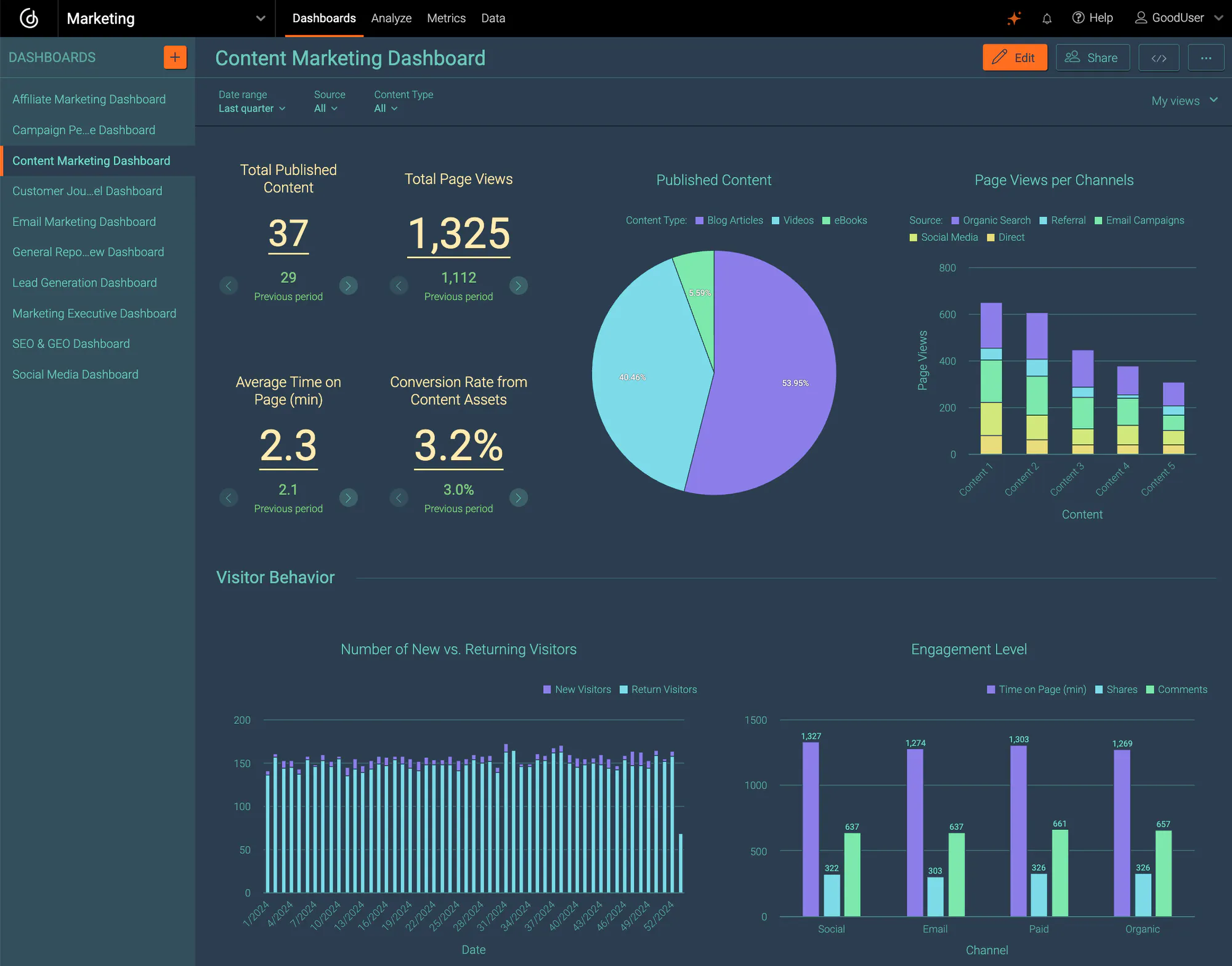
You do not need a complicated business-intelligence system. A monthly dashboard can be simple.
Core metrics
- Total generative AI impressions.
- Top 20 visible pages.
- Top topic groups.
- Top countries.
- Device distribution.
- Traditional Search clicks for those pages.
- Conversions or qualified actions from those pages.
Quality indicators
Add a few editorial indicators:
- Original research present: yes/no.
- First-hand examples present: yes/no.
- Last reviewed date.
- Important facts verified.
- Useful visual content present.
This keeps the team focused on content quality instead of only chasing impression totals.
Connect Search Console Data With Business Outcomes
Visibility is useful, but a business needs more than impressions.
A page can receive large AI exposure and still contribute little revenue or qualified engagement. Another page may receive fewer impressions but influence high-value buyers.
Track downstream behavior
For pages receiving AI visibility, measure actions such as:
- Newsletter sign-ups.
- Product views.
- Demo requests.
- Contact submissions.
- Downloads.
- Purchases.
- Return visits.
The right conversion depends on the page’s purpose. An educational guide may be valuable even if it does not produce an immediate sale.
Use AI Visibility to Improve Internal Linking
If one informational page receives strong AI exposure, make sure it helps users discover the next useful page on your site.
For example, a high-performing guide about local SEO can link naturally to:
- A Google Business Profile optimization guide.
- A local keyword research article.
- A citation cleanup checklist.
- A service page if the intent fits.
Do not add links simply to spread “authority.” Add them because the next page helps the reader continue solving the problem.
Watch for False Conclusions
Correlation is not causation
If pages with videos receive more AI visibility, that does not prove adding a video caused the increase. Those pages may simply be stronger overall.
A short decline is not a penalty
Search demand and feature availability can change. A few days of lower impressions do not automatically mean Google has downgraded the site.
More impressions are not always better
If visibility grows for irrelevant topics, that can create noise rather than business value.
One site is not the whole web
Patterns on your website may not apply to every industry. Treat your own data as evidence for your site, not a universal ranking formula.
A Monthly AI Search Review Process
Step 1: review visibility trends
Check site-wide movement, but spend more time on topic and page groups.
Step 2: identify meaningful winners and losers
Focus on changes that persist, not small daily movement.
Step 3: inspect page quality
Read the page as a user. Is the information current? Is the answer clear? Is there something original?
Step 4: check technical health
Confirm important pages are indexed and canonicalized correctly. Look for accidental noindex tags, broken internal links, or major rendering issues.
Step 5: compare with business data
Ask whether visibility is leading to useful engagement, leads, sales, subscriptions, or other outcomes.
Step 6: choose a small number of improvements
Update the pages where a clear user problem exists. Do not rewrite everything because one report changed.
What Not to Do
- Do not create hundreds of thin pages for imagined AI prompts.
- Do not stuff “AI Overview” or “AI Mode” keywords into unrelated articles.
- Do not judge success only by impressions.
- Do not copy the structure of one winning page into every post.
- Do not update dates without updating content.
- Do not use Search Console data as a replacement for user and business metrics.
Final Takeaway
Google Search Console‘s 2026 Generative AI reports give website owners something they have needed for a long time: a direct view into how their pages appear in AI-driven Search experiences.
The best use of that data is diagnostic. Find which pages earn visibility. Understand what those pages do well. Compare AI exposure with traditional Search, clicks, user behavior, and business outcomes. Then improve pages where there is a genuine gap.
AI-search reporting should make your SEO decisions more evidence-based, not more reactive. If you use it to strengthen original, accurate, useful content, it becomes a valuable part of a modern Search Console workflow.
Visual AI-Search Reporting Checklist
1. Connect visibility with the real search experience

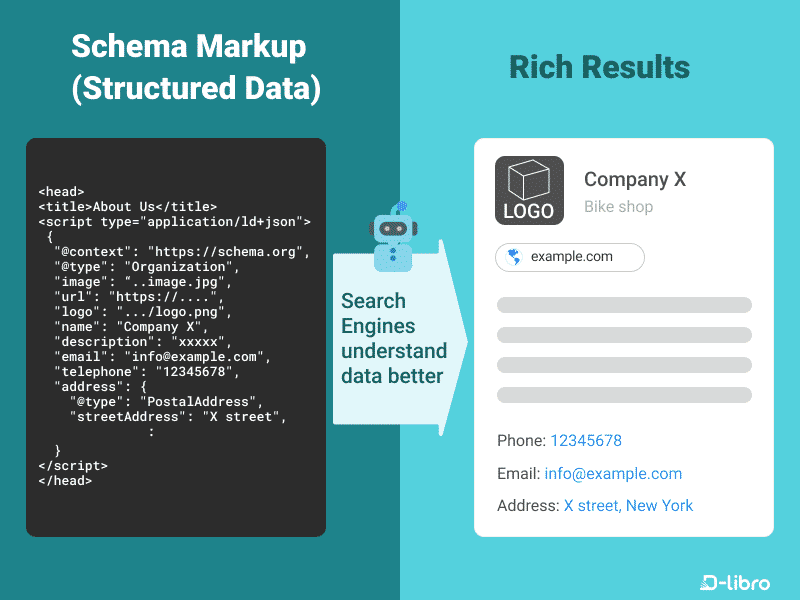
2. Check machine clarity without chasing markup tricks
3. Add business context to the dashboard
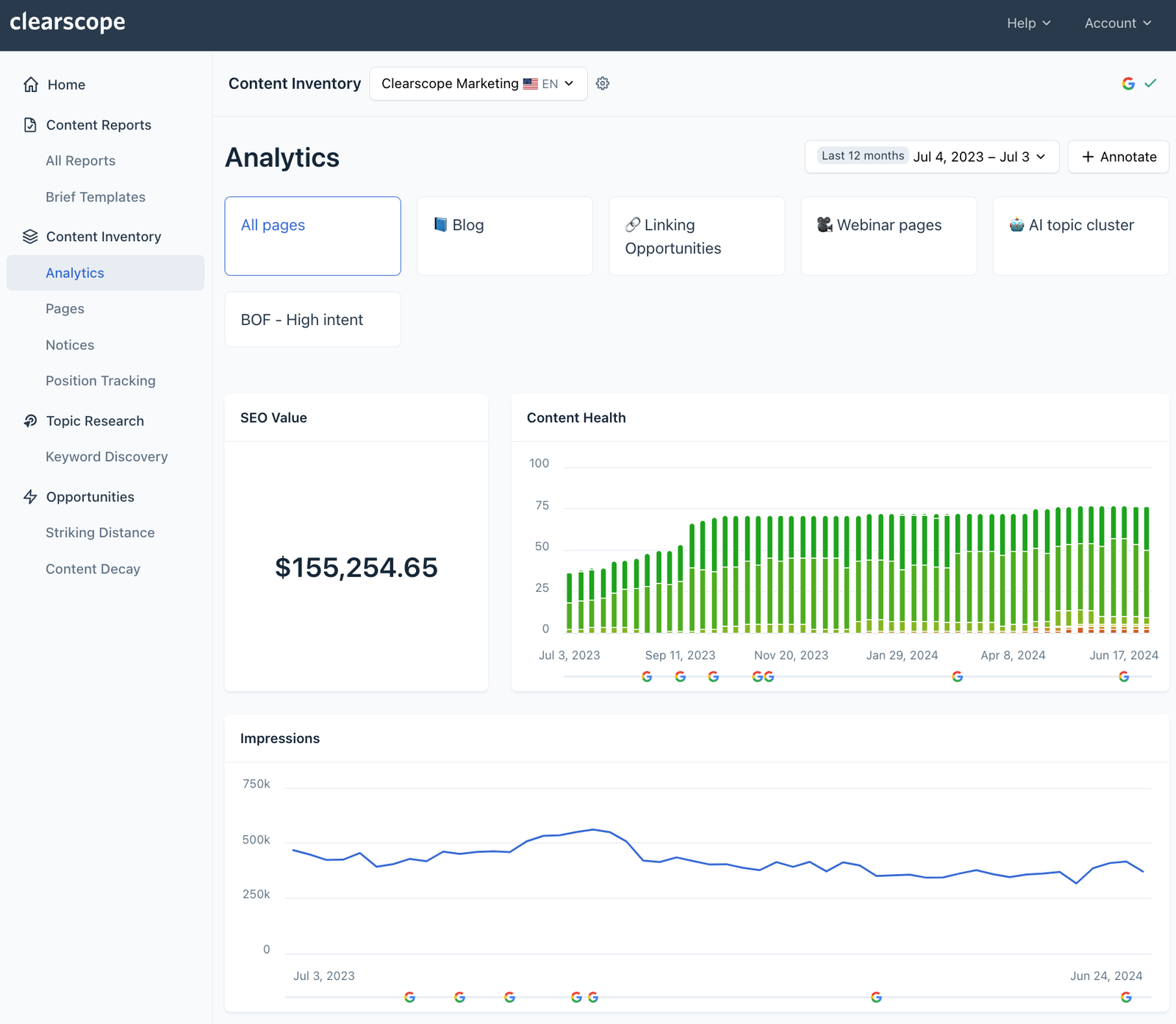
4. Turn reporting into a controlled improvement cycle


One thought on “How to Measure AI Search Visibility in Google Search Console in 2026”